Top DJ software has revolutionized the art of DJing, offering powerful tools and intuitive interfaces for both beginners and seasoned professionals. This guide delves into the world of leading DJ software packages, exploring their features, capabilities, and suitability for various skill levels and performance styles. We’ll examine essential and advanced features, hardware compatibility, user experience, and future trends shaping this dynamic field.
From understanding the core functionalities that define top-tier software to exploring lesser-known gems and advanced techniques, we aim to provide a complete overview. We’ll also compare various software options, considering factors like system requirements, user interfaces, and learning curves, ensuring you find the perfect software to match your needs and ambitions.
Defining “Top DJ Software”
Defining “top DJ software” isn’t simply about listing the most popular programs; it requires a nuanced understanding of several crucial factors. A truly top-tier DJ software package excels not only in its feature set but also in its usability, industry acceptance, and overall impact on the DJ’s workflow. It seamlessly blends powerful tools with an intuitive interface, allowing DJs of all skill levels to focus on creativity rather than technical hurdles.
The key characteristics differentiating top-tier DJ software from less successful alternatives often lie in subtle yet significant details. For instance, a superior software might offer advanced beat-matching algorithms that are more accurate and responsive, resulting in smoother transitions. Another key differentiator could be a more robust effects engine, allowing for greater creative control and unique sonic manipulations. Furthermore, strong community support, regular updates with new features and bug fixes, and integration with popular hardware controllers significantly contribute to a software’s overall standing. Ultimately, a “top” DJ software package becomes a reliable and intuitive extension of the DJ’s artistic vision.
DJ Software Categories
Different types of DJ software cater to various needs and preferences. Understanding these categories helps in selecting the appropriate tool for a specific workflow. Each category offers a unique approach to DJing, impacting the user experience and creative possibilities.
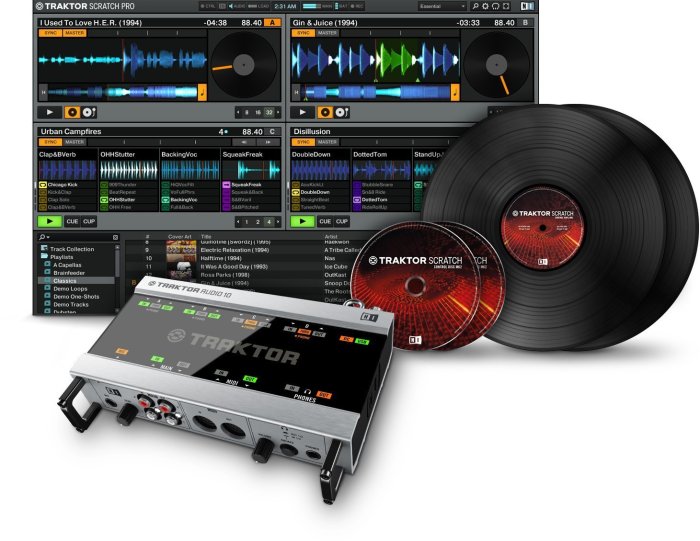
- Digital Vinyl Systems (DVS): These systems utilize timecode vinyl or CDs to control digital audio files within the software. They provide a familiar tactile experience for DJs accustomed to traditional vinyl mixing, offering precise control and a tangible connection to the music. Examples include Traktor Pro with Traktor Scratch, and Serato DJ Pro with Serato DVS. The software interacts with a turntable and mixer, interpreting the timecode signals to manipulate the digital audio.
- Controller Software: Designed to work seamlessly with dedicated DJ controllers, this software provides a more integrated and often simplified workflow. The controller’s buttons, knobs, and faders directly map to functions within the software, offering a hands-on approach to mixing and effects. Popular examples include Rekordbox DJ, Serato DJ Pro, and Traktor Pro. These softwares offer a range of customization options to tailor the controller’s functionality to individual preferences.
- Standalone Software: This category encompasses software that can function independently, without the need for a dedicated controller. While it may offer less tactile control than controller software, it provides flexibility for DJs who prefer mouse and keyboard operation or prefer to use a minimal setup. Examples include Mixxx (open-source) and some versions of Virtual DJ. This type of software is particularly suitable for beginners or those who want a less hardware-intensive setup.
Popular DJ Software Options
Choosing the right DJ software can significantly impact your workflow and creative output. The market offers a diverse range of options, each with its strengths and weaknesses. Selecting the best software depends on your skill level, budget, and specific needs. This section will explore some of the most popular and lesser-known but highly-regarded DJ software packages available.
Popular DJ Software Comparison
The following table compares four leading DJ software packages, highlighting their key features, advantages, and disadvantages. Consider these factors when making your choice.
| Name | Key Features | Pros | Cons |
|---|---|---|---|
| Traktor Pro | Advanced mixing capabilities, Remix Decks, looping, effects, MIDI mapping, integration with hardware | Powerful features, excellent sound quality, extensive customization options, robust performance | Steeper learning curve, can be expensive, requires powerful hardware for optimal performance |
| Serato DJ Pro | Intuitive interface, extensive library management tools, DVS support, high-quality effects, integration with hardware | User-friendly interface, excellent library management, reliable performance, strong community support | Limited advanced features compared to Traktor, can be expensive for some users |
| Rekordbox DJ | Seamless integration with Pioneer DJ hardware, cloud library syncing, performance mode, advanced features like key detection and phrase analysis | Excellent hardware integration, strong cloud functionality, relatively user-friendly, free basic version available | Some features might require a paid subscription, less extensive effects compared to other options |
| Virtual DJ | Cross-platform compatibility, wide range of effects, video mixing capabilities, supports various controllers | Versatile, affordable, supports various hardware, video mixing functionality | Interface can feel cluttered, some users report occasional performance issues |
Lesser-Known but Highly-Rated DJ Software, Top dj software
While the software listed above dominates the market, several lesser-known options offer unique features and cater to specific needs. These often provide a compelling alternative for DJs seeking something different.
Here are five examples:
- Mixxx: A free, open-source DJ software known for its cross-platform compatibility and extensive customization options. It offers a powerful feature set despite its free status.
- djay Pro AI: This software incorporates AI-powered features like automatic beat matching and intelligent track suggestions, streamlining the mixing process. It’s known for its user-friendly interface.
- Cross DJ: A feature-rich software offering a balance between power and ease of use. It’s popular for its intuitive interface and strong performance.
- Deckadance: This software is particularly strong in its video mixing capabilities and is a popular choice for VJs and DJs who incorporate visuals into their performances.
- Ohm Studio: While primarily a DAW, Ohm Studio’s collaborative features and integrated effects make it suitable for collaborative DJing and live remixing.
System Requirements Comparison
System requirements vary considerably between DJ software. Choosing software that matches your computer’s capabilities is crucial for smooth performance and preventing lag. The table below shows the recommended system requirements for three leading DJ software packages. These are general recommendations; actual requirements might vary depending on the complexity of your setup and the number of effects used.
| Software | Minimum RAM | Recommended RAM | Minimum Processor | Recommended Processor |
|---|---|---|---|---|
| Traktor Pro | 4 GB | 8 GB | Intel Core i5 or equivalent | Intel Core i7 or equivalent |
| Serato DJ Pro | 4 GB | 8 GB | Intel Core i5 or equivalent | Intel Core i7 or equivalent |
| Rekordbox DJ | 4 GB | 8 GB | Intel Core i5 or equivalent | Intel Core i7 or equivalent |
Essential Features of Top DJ Software
Top-tier DJ software isn’t just about playing tracks; it’s about seamlessly blending, manipulating, and creatively shaping the musical experience. Several core features consistently elevate software from “good” to “essential” for professional and aspiring DJs alike. These features significantly impact a DJ’s performance, workflow efficiency, and overall creative output.
Five key features consistently distinguish top-rated DJ software. These features, while often present across various packages, differ significantly in their implementation, user interface design, and overall functionality. This leads to varying degrees of ease of use, creative control, and overall performance.
Beatmatching and Synchronization
Accurate beatmatching is fundamental to a smooth and professional DJ set. Top DJ software employs advanced algorithms to analyze the BPM (beats per minute) of tracks and automatically synchronize them, minimizing manual adjustments. Software like Traktor Pro offers sophisticated beatgrid editing tools for fine-tuning synchronization, while Serato DJ Pro focuses on a more intuitive, user-friendly approach. The differences lie in the precision of the algorithms, the flexibility of manual adjustments, and the overall responsiveness of the software. For instance, Traktor’s advanced grid editing allows for precise correction of off-beat tracks, crucial for older or less accurately tagged music, while Serato’s focus on ease of use might make it preferable for DJs prioritizing speed and simplicity.
Effects Processing
The ability to manipulate audio in real-time is a hallmark of professional DJing. Top software packages provide a range of built-in effects, including EQs, filters, delays, reverbs, and more. These effects allow DJs to shape the sound of their mixes, creating transitions, building energy, and adding unique creative flourishes. Ableton Live, known for its powerful audio effects processing, offers a wide array of customizable parameters, allowing for deep sonic manipulation, while Rekordbox DJ provides a more streamlined selection of effects, prioritizing ease of use and intuitive control. The differences in implementation often relate to the number of effects, the depth of parameter control, and the overall ease of use.
Looping and Cue Points
Looping and cue points are essential for creating dynamic mixes and performing seamless transitions. Looping allows DJs to repeat sections of tracks, building energy or creating rhythmic emphasis. Cue points enable DJs to mark specific points within a track for easy access during mixing. The implementation of these features varies across different software. For example, some software packages offer advanced looping options, such as nested loops and loop rolls, while others prioritize a simpler, more intuitive interface. Virtual DJ, for example, allows for very complex loop manipulation, while others might offer fewer options, but perhaps a more visual and easily navigable interface.
Mixer Functionality
The virtual mixer is the heart of any DJ software. Top software provides comprehensive mixing capabilities, including crossfaders, EQs, filters, and effects sends. These controls allow DJs to blend tracks smoothly, create transitions, and add creative effects. The implementation of the mixer can significantly impact a DJ’s workflow. Some software packages offer highly customizable mixers with extensive routing options, while others prioritize a simpler, more intuitive layout. Mixxx, for example, is known for its highly customizable mixer layout and routing, while other software prioritizes ease of use and simple controls.
Library Management
Effectively managing a music library is crucial for any DJ. Top DJ software packages provide robust library management tools, allowing DJs to organize, search, and browse their music collections easily. These tools typically include features like smart playlists, searching, and the ability to rate and tag tracks. The differences in library management capabilities often lie in the speed and efficiency of the search function, the flexibility of the tagging system, and the overall ease of navigation. Serato DJ Pro, for instance, offers robust tagging and crate organization tools, while others may focus more on intuitive browsing and less on extensive metadata tagging.
Advanced Features and Techniques
Professional DJ software goes beyond basic mixing; it offers advanced features that empower DJs to craft unique and engaging sets. These tools allow for complex manipulations of audio, enhancing creativity and audience interaction. Mastering these features is crucial for DJs aiming to elevate their performances to a professional level.
Three advanced features commonly found in professional DJ software are advanced loop manipulation, sophisticated beatmatching algorithms, and harmonic mixing tools. These features significantly impact a DJ’s ability to create seamless transitions, build tension, and maintain a dynamic soundscape throughout their set.
Loop Manipulation Techniques
Precise loop manipulation is key to creating impactful breakdowns and remixing tracks on the fly. This involves not only starting and stopping loops but also adjusting their length, quantizing them to the beat, and using features like loop rolls and stutter effects. The ability to seamlessly manipulate loops allows for creative improvisation and the creation of unique sonic textures within a DJ set.
Choosing the right top DJ software is crucial for a seamless performance. Software compatibility issues can be frustrating, as anyone who’s experienced problems like those described in this article on tinfoil unable to start software will attest. Fortunately, most reputable DJ software packages are generally stable and reliable, allowing you to focus on the music and the crowd.
Let’s illustrate loop manipulation using Traktor Pro’s loop features. Assume we have a track loaded in Deck A.
- Set Loop Points: Using the mouse or jog wheel, select the desired section to loop. Traktor’s loop markers are visually represented on the waveform.
- Adjust Loop Length: Once the loop is set, you can adjust its length by dragging the loop markers. This allows for fine-tuning the loop to fit the rhythmic context of the mix.
- Loop Roll: Engage the loop roll function. This rapidly repeats the loop, creating a rhythmic, percussive effect. The speed and style of the loop roll can often be adjusted.
- Loop Quantize: To ensure the loop is perfectly synced to the beat, use the quantize function. This snaps the loop points to the nearest beat, avoiding rhythmic inconsistencies.
Comparative Analysis of Beatmatching Algorithms
Beatmatching algorithms, while seemingly simple, vary significantly in their sophistication across different software packages. High-quality algorithms offer accurate beat detection even with complex rhythmic patterns, ensuring smooth transitions and avoiding jarring shifts in tempo. This is especially important when working with a variety of musical styles and tempos.
| Feature | Traktor Pro | Serato DJ Pro |
|---|---|---|
| Beat Detection Accuracy | Highly accurate, even with complex rhythms. Uses advanced algorithms to handle variations in tempo. | Accurate, but may struggle slightly with more obscure or heavily processed tracks. Relies on a combination of spectral and tempo analysis. |
| Beatgrid Editing Capabilities | Offers extensive manual beatgrid editing tools for precise control, allowing for correction of inaccuracies. | Provides manual editing capabilities, but the interface is less intuitive than Traktor’s. |
| Tempo Adjustment Smoothing | Provides various tempo adjustment curves for smooth transitions, minimizing jarring changes. | Offers smooth tempo adjustments, but the level of control over the curve is less granular than in Traktor. |
Harmonic Mixing Capabilities
Harmonic mixing leverages musical key analysis to ensure smooth transitions between tracks. By matching the keys or relative keys of songs, DJs can create a more cohesive and euphoric listening experience. Software packages differ in their implementation of this feature, affecting the accuracy of key detection and the tools provided for key matching.
While both Traktor Pro and Serato DJ Pro offer key detection and harmonic mixing features, their approaches differ. Traktor Pro’s implementation often involves a more visual representation of key relationships, making it easier for DJs to understand and utilize harmonic mixing principles. Serato DJ Pro’s approach, while effective, may be less visually intuitive, requiring more familiarity with musical theory.
Software Integration and Hardware Compatibility
Choosing the right DJ software is only half the battle. Seamless integration with your hardware is crucial for a smooth and efficient workflow. The right combination of software and hardware can unlock creative potential, while a poor match can lead to frustration and technical difficulties. This section explores the vital relationship between DJ software and controllers, highlighting the benefits of compatibility and the potential pitfalls of incompatibility.
The importance of a harmonious relationship between DJ software and hardware controllers cannot be overstated. Seamless integration allows for intuitive control over all aspects of the DJ performance. Features like beatmatching, looping, and effects are significantly enhanced when the software and hardware work together seamlessly. This translates directly to a more fluid and creative DJ set, allowing for spontaneous mixing and improvisation. A well-integrated system reduces latency, ensuring that your actions are reflected accurately and instantly in the software, avoiding frustrating delays.
Popular DJ Controllers and Software Compatibility
The compatibility between DJ software and hardware controllers varies. While many controllers are designed to work with multiple software platforms, some offer optimized functionality with specific programs. Understanding these relationships is crucial for making informed purchasing decisions.
- Pioneer DJ DDJ-1000: Highly compatible with Rekordbox DJ (its native software), but also works well with Serato DJ Pro and Virtual DJ. This controller boasts excellent integration with Rekordbox DJ, offering features like dedicated performance pads and a high-quality mixer.
- Native Instruments Traktor Kontrol S4 MK3: Designed specifically for Traktor Pro, this controller provides a deeply integrated experience with the software. It’s less commonly used with other software platforms, though some limited functionality may be achieved through mapping.
- Reloop MIXON 4: This versatile controller is compatible with various DJ software packages, including Serato DJ Pro, Rekordbox DJ, and Virtual DJ. Its flexibility allows DJs to choose the software that best suits their needs and preferences.
- Numark NS6II: Primarily compatible with Serato DJ Pro, offering a tight integration with its features and workflow. This controller is known for its robust build and reliable performance within the Serato ecosystem.
- Denon DJ MCX8000: This standalone controller offers built-in software (Engine DJ) and works with Serato DJ Pro as well. This combination of options provides flexibility and ease of use for different DJing styles and preferences.
Challenges of Incompatibility Between DJ Software and Hardware
Compatibility issues between DJ software and hardware can significantly hinder a DJ’s performance. Problems can range from minor inconveniences to complete system failure.
Potential issues include:
- Lack of functionality: Certain controller features might not function correctly or at all with incompatible software, limiting creative options and workflow efficiency.
- Latency issues: Delays between actions on the controller and their reflection in the software can disrupt the flow of a DJ set, making beatmatching and mixing difficult.
- Mapping difficulties: Manually mapping controls can be time-consuming and complex, requiring technical expertise. Incorrect mapping can lead to unexpected behavior and errors.
- Driver conflicts: Conflicting drivers can cause system instability, crashes, and unpredictable performance.
- Limited support: Incompatibility can lead to limited or nonexistent technical support, leaving DJs to troubleshoot problems on their own.
User Experience and Learning Curve: Top Dj Software
Choosing the right DJ software often hinges on its user experience and the associated learning curve. A well-designed interface can significantly accelerate the learning process, allowing beginners to quickly grasp the fundamentals and experienced DJs to seamlessly integrate advanced techniques. Conversely, a poorly designed interface can lead to frustration and hinder creative workflow. This section examines the user interfaces of popular DJ software, compares their learning curves, and provides a basic mixing tutorial.
User Interface Design of Popular DJ Software
Three popular DJ software packages—Traktor Pro, Serato DJ Pro, and Rekordbox—offer distinct user interface designs catering to different preferences. Traktor Pro, known for its powerful features, presents a more complex interface with numerous customizable options. This can be overwhelming for beginners but highly rewarding for experienced users who appreciate the granular control. Serato DJ Pro, on the other hand, prioritizes a clean and intuitive layout, making it easier to learn and navigate, particularly for those new to DJing. Rekordbox, designed by Pioneer DJ, integrates seamlessly with their hardware, featuring a visually appealing and relatively straightforward interface. It’s known for its user-friendly library management features. While each software’s interface offers distinct visual styles and arrangement of controls, all three provide clear visual cues and feedback for intuitive operation.
Learning Curve Comparison of DJ Software Packages
The learning curve for each software package varies. Serato DJ Pro, with its straightforward layout and clear visual cues, generally presents the gentlest learning curve. Its intuitive design allows beginners to quickly grasp the basic mixing functionalities. Rekordbox also offers a relatively smooth learning experience, particularly for those already familiar with Pioneer DJ hardware. Traktor Pro, due to its extensive features and customization options, presents a steeper learning curve. While its advanced capabilities are highly attractive to professionals, mastering all its features requires more time and dedication. However, the comprehensive tutorials and online resources available for all three packages mitigate the initial learning curve to some extent.
Basic DJ Mix Tutorial using Serato DJ Pro
This tutorial Artikels a basic two-track mix using Serato DJ Pro. Assume you’ve already loaded two tracks into Serato’s library and are ready to begin.
- Load Tracks: Load your chosen tracks into the decks (Deck A and Deck B). Serato’s intuitive drag-and-drop functionality makes this simple.
- Beatmatching: Use the jog wheels or pitch faders to adjust the tempo of one track to match the tempo of the other. Serato’s beatgrid analysis helps significantly with this process. Aim for a smooth transition, ensuring both tracks are playing at the same BPM.
- Cue Points: Set cue points on both tracks to mark key sections or phrases. This helps to ensure a clean and seamless mix.
- Mixing: Gradually increase the volume of the second track (Deck B) while simultaneously decreasing the volume of the first track (Deck A). This is commonly known as a crossfade.
- EQ and Effects: Use the EQ controls to adjust the bass, mid, and treble frequencies of each track to create a balanced and cohesive sound. Experiment with Serato’s built-in effects to add creative flair to your mix.
- Looping: Use the loop function to extend sections of a track for a more extended mix. This is particularly useful for building energy and creating transitions.
- Transition: Once the second track is at full volume, remove the first track completely. This creates a seamless transition between the two tracks.
Future Trends in DJ Software
Source: stayonbeat.com
The evolution of DJ software is intrinsically linked to advancements in technology. We’re moving beyond simple waveform manipulation and into an era where AI, VR, and other emerging technologies are poised to fundamentally reshape the DJing experience, offering unprecedented creative possibilities and streamlining workflows. This section explores the exciting potential of these future trends.
AI-Powered Features and Automation
Artificial intelligence is set to revolutionize DJ software in several key ways. Imagine software capable of intelligently analyzing a DJ’s current set, predicting the next track based on musical key, tempo, and even audience response data (gathered through sensors or app integration). This could lead to automated transitions, intelligent playlist generation, and even the creation of entirely new mixes based on user-defined parameters. For example, a DJ could input a desired mood or genre, and the AI would generate a seamless, dynamically mixed set tailored to that specification. Furthermore, AI could be utilized for real-time remixing, offering on-the-fly manipulation of existing tracks, creating variations and edits with minimal manual input. This automation frees the DJ to focus more on performance and crowd interaction.
Immersive Experiences with Virtual and Augmented Reality
Virtual and augmented reality (VR/AR) technologies are ripe for integration into DJ software. Imagine a DJ performing in a fully immersive virtual environment, customized to their preferences. This could include interactive visuals synchronized with the music, realistic virtual crowds responding to the performance, and even the ability to manipulate virtual instruments and effects in real-time. Similarly, AR could overlay information about the music and audience onto the real-world environment, providing the DJ with valuable data and enhancing their performance. For example, a DJ could use AR glasses to see a visual representation of the music’s waveform and key changes, facilitating seamless transitions and creative mixing. This blend of real and virtual worlds promises a profoundly enhanced and personalized DJ experience.
Enhanced Hardware Integration and Haptic Feedback
Future DJ software will likely see tighter integration with advanced hardware. We can expect improved compatibility with higher-resolution screens, more intuitive controllers with haptic feedback (providing tactile sensations that reflect the music), and advanced audio interfaces capable of processing higher fidelity audio. Haptic feedback, for instance, could allow DJs to “feel” the beat and transitions more intuitively, leading to more precise and expressive performances. This level of integration would create a more seamless and responsive workflow, blurring the lines between the digital and physical aspects of DJing.
Last Word
Ultimately, choosing the right DJ software depends on individual preferences, technical skills, and performance goals. Whether you’re a budding DJ seeking an intuitive entry point or a seasoned professional demanding advanced features, this guide has provided a thorough exploration of the leading options available. By understanding the key features, compatibility considerations, and future trends, you can confidently select the software that best empowers your creative vision and elevates your DJing to new heights.