Nail salon software is revolutionizing the beauty industry, offering a comprehensive suite of tools designed to enhance efficiency, boost client satisfaction, and ultimately, drive profitability. From streamlined appointment scheduling and robust client management to integrated payment processing and targeted marketing campaigns, these sophisticated systems are transforming how nail salons operate.
This exploration delves into the key features, benefits, and considerations involved in selecting and implementing the right nail salon software for your specific needs. We’ll examine various pricing models, integration capabilities with other business tools, and critical aspects of data security and privacy. Understanding these elements is crucial for making an informed decision that will optimize your salon’s performance and growth.
Nail Salon Software Features
Effective nail salon software streamlines operations, enhances client management, and improves overall business efficiency. A robust system integrates various functionalities to provide a comprehensive solution for salon owners and staff. This allows for better organization, reduced administrative burden, and ultimately, increased profitability.
Core Features of Nail Salon Software
Nail salon software typically includes a suite of features designed to manage all aspects of the business. These core features often encompass appointment scheduling, client management, employee management, inventory tracking, point-of-sale (POS) integration, and reporting and analytics. Some systems also offer marketing tools, such as email marketing and loyalty programs. The specific features offered can vary depending on the software provider and pricing tier.
Appointment Scheduling Features Comparison
Different software options offer varying levels of sophistication in their appointment scheduling capabilities. Basic systems may offer simple calendar views and appointment creation, while more advanced systems provide features like online booking, automated reminders, waitlist management, and staff scheduling optimization. For example, some software might allow clients to book appointments directly through the salon’s website or social media pages, while others may only allow scheduling through the software interface itself. The level of integration with other calendar systems also varies; some seamlessly integrate with Google Calendar, while others operate independently. Advanced features such as automated SMS or email reminders for appointments can significantly reduce no-shows.
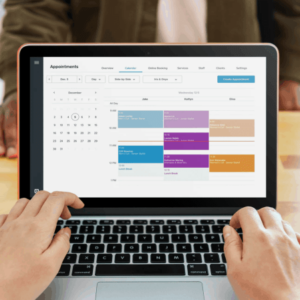
Client Appointment Management Module User Interface Mockup
Imagine a user interface with a clean, intuitive design. The main screen displays a monthly calendar view, color-coded by appointment type (e.g., manicure, pedicure, acrylics). Each appointment slot shows the client’s name and the service booked. A sidebar displays a list of upcoming appointments, a search bar for quickly finding clients, and buttons for adding new appointments or editing existing ones. Adding a new appointment opens a pop-up window with fields for client selection (from a searchable database), service selection (from a predefined list), date and time selection, and any notes or special requests. The interface should be easily navigable and visually appealing, using clear icons and labels. The color scheme should be calming and professional, reflecting the atmosphere of a nail salon.
Client Data Management and Security
Client data management is crucial for maintaining a strong client base and providing personalized services. This includes securely storing client contact information, appointment history, service preferences, and payment information. Robust security measures are essential to protect this sensitive data from unauthorized access or breaches. This involves using strong encryption, secure servers, and adhering to data privacy regulations like GDPR or CCPA. Data backups should be regularly performed to prevent data loss. Access control should be implemented to limit access to client data to authorized personnel only. Regular security audits and updates to the software are crucial to maintaining the security of the system. Failure to implement adequate security measures can lead to significant financial and reputational damage for the salon.
Pricing and Payment Processing
Choosing the right nail salon software involves careful consideration of pricing and payment processing capabilities. The cost of the software itself varies widely, depending on features, scalability, and the provider. Equally important is how seamlessly the software integrates with your preferred payment gateway, impacting efficiency and potentially revenue.
Pricing Models for Nail Salon Software
Nail salon software typically employs subscription-based pricing models. These models often vary based on the number of users, features included, and the level of support provided. Some offer tiered plans, starting with a basic package for smaller salons and escalating to enterprise-level solutions for larger businesses with more complex needs. Others may offer customized pricing based on a salon’s specific requirements. It’s crucial to carefully evaluate the features included in each tier to determine the best value for your investment. For example, a basic plan might include appointment scheduling and client management, while more advanced plans may add features like inventory management, marketing tools, and employee scheduling. Hidden fees or additional charges for add-ons should also be considered.
Payment Gateway Integrations
Many nail salon software solutions integrate with popular payment gateways such as Square, Stripe, and PayPal. These integrations allow for streamlined payment processing, directly within the software. This eliminates the need for manual entry of payment information and reduces the risk of errors. For instance, a salon using Square can process credit card payments, track transactions, and reconcile accounts all within the software interface. The integration typically involves linking your payment gateway account to the software, often through API connections. The specific integration process varies depending on the software and payment gateway.
Benefits and Drawbacks of Payment Processing Options
Offering diverse payment options is crucial for customer convenience and increased sales. While integrating with a popular gateway like Square offers convenience and security, it often involves transaction fees. These fees can vary depending on the payment gateway and the type of transaction (e.g., credit card vs. debit card). Processing payments directly through the software, as opposed to manually, reduces the risk of human error and speeds up the checkout process, contributing to a more efficient workflow. However, relying solely on one payment method might limit your customer base. Offering multiple payment options (e.g., cash, credit cards, mobile payments) can broaden your appeal and cater to diverse customer preferences. The security features of the chosen payment gateway are also vital to consider, ensuring the protection of sensitive customer data.
Comparison of Nail Salon Software Options
The following table compares three hypothetical nail salon software options, highlighting their pricing, features, and payment gateway integrations. Remember that actual pricing and features can vary. This is for illustrative purposes only.
| Software | Pricing Plan (Monthly) | Key Features | Payment Gateway Integrations |
|---|---|---|---|
| SalonPro | $49 – $199 | Appointment scheduling, client management, inventory tracking, employee scheduling, reporting | Square, Stripe, PayPal |
| NailStyle | $39 – $149 | Appointment scheduling, client management, marketing tools, loyalty program | Square, PayPal |
| GlamGlow | $59 – $249 | Appointment scheduling, client management, inventory tracking, employee scheduling, reporting, online booking | Stripe, PayPal, Square |
Marketing and Customer Relationship Management (CRM)
Effective marketing and robust customer relationship management (CRM) are crucial for the success of any nail salon. Our software integrates powerful CRM features designed to streamline your marketing efforts, cultivate customer loyalty, and ultimately boost your bottom line. This allows you to focus on what you do best: providing exceptional nail services.
Our software provides a centralized hub for managing all your client interactions, from initial appointment booking to post-service follow-ups. This integrated approach simplifies your workflow and empowers you to build stronger, more profitable relationships with your clientele.
Key CRM Features for Nail Salon Marketing
Several key CRM features within our software directly benefit your nail salon’s marketing strategies. These tools allow for personalized communication, targeted promotions, and efficient client management, leading to increased customer retention and revenue generation.
- Client Segmentation: Categorize clients based on various criteria (e.g., service frequency, spending habits, preferred nail technician) to personalize marketing efforts and offer tailored promotions.
- Automated Email Marketing: Schedule and send targeted email campaigns based on client segmentation, promoting new services, special offers, or upcoming events.
- Birthday/Anniversary Reminders: Automatically send personalized birthday or anniversary greetings with exclusive offers to enhance client relationships and drive repeat business. Imagine the positive response to a “Happy Birthday! Enjoy 15% off your next appointment” email.
- Client Communication Tracking: Maintain a detailed record of all client interactions, including appointments, emails, and notes, to ensure consistent and personalized service.
Loyalty Program Implementation
Implementing a robust loyalty program is simplified with our software. The system allows for easy tracking of points, rewards redemption, and customized tier structures to incentivize repeat business and reward your most loyal clients.
- Points-Based System: Award points for every dollar spent or service received. Clients can redeem points for discounts, free services, or exclusive products.
- Tiered Rewards: Offer escalating rewards based on accumulated points or spending levels. This creates a sense of exclusivity and encourages higher spending.
- Automated Reward Notifications: Automatically notify clients when they reach reward milestones, prompting them to redeem their points and encouraging further visits.
- Reporting and Analytics: Track loyalty program participation and effectiveness to optimize your strategy and maximize its impact on revenue.
Automated Appointment Reminders and Promotional Offers
Reduce no-shows and increase revenue with automated appointment reminders and targeted promotional offers. Our software seamlessly integrates these features, improving efficiency and client satisfaction.
- Automated Appointment Reminders: Send automated email or SMS reminders before appointments, minimizing no-shows and improving scheduling efficiency. A simple reminder like, “Your appointment at [Salon Name] is tomorrow at [Time]!” can make a big difference.
- Targeted Promotional Offers: Send customized promotional offers based on client preferences, purchase history, or appointment frequency. For example, offer a discount on a specific service a client hasn’t tried before.
- Promotional Calendar: Schedule and manage promotional campaigns, ensuring timely and relevant offers are sent to your clients.
Sample Email Marketing Campaign
A successful email marketing campaign utilizes client data effectively. Consider this example:
Campaign Goal: Increase bookings for the new “Gel-X” manicure service.
Target Audience: Clients who have booked a regular manicure in the past 3 months but haven’t tried Gel-X.
Efficient nail salon management requires dedicated software to handle appointments, client records, and inventory. This need highlights the broader importance of specialized software in streamlining various business operations. Ultimately, selecting the right nail salon software can significantly improve productivity and client satisfaction, leading to a more successful business.
Email Subject Line: Introducing Gel-X: The Next Generation Manicure!
Email Body: Hi [Client Name], We’re excited to introduce our new Gel-X manicure service! Experience the ultimate in nail strength and shine. Book your Gel-X manicure today and receive 15% off your first appointment. [Link to booking page]
Tracking: Monitor open rates, click-through rates, and bookings generated from the campaign to measure its effectiveness and refine future campaigns.
Inventory Management and Reporting: Nail Salon Software
Efficient inventory management is crucial for the profitability and smooth operation of any nail salon. Nail salon software streamlines this process, providing tools to track stock levels, monitor product usage, and generate insightful reports for informed business decisions. This allows salon owners to optimize purchasing, minimize waste, and ultimately enhance their bottom line.
Inventory Tracking Functionalities
Nail salon software offers a range of functionalities to track inventory effectively. These typically include the ability to create a comprehensive product database, specifying details such as product name, supplier, purchase price, retail price, and SKU (Stock Keeping Unit). The software then allows for easy recording of stock additions (purchases) and deductions (sales and usage). Real-time tracking of inventory levels provides immediate visibility into stock availability, preventing stockouts and ensuring sufficient supplies for services. Additionally, the software may incorporate features such as setting reorder points, generating automatic purchase orders, and managing expiration dates for perishable items.
Tracking Product Usage and Identifying Low-Stock Items
A key feature of effective nail salon software is its ability to track product usage. This often involves integrating inventory management with appointment scheduling. When a service is completed, the software can automatically deduct the used products from the inventory based on the service’s product requirements pre-defined by the salon owner. This automated process minimizes manual data entry and reduces the risk of errors. The software can then generate alerts when stock levels fall below pre-set thresholds, indicating low-stock items that require immediate attention. This proactive approach ensures that popular products are always available, preventing disruption to salon services.
Examples of Reports Generated for Business Analysis
Nail salon software generates various reports to facilitate business analysis and decision-making. These reports can provide insights into sales trends, inventory turnover, profitability of specific products or services, and overall business performance. Examples include sales reports (by product, service, or employee), inventory reports (showing current stock levels, low-stock items, and value of inventory), and profit and loss statements. These reports can be customized to display data over various time periods, allowing for trend analysis and forecasting.
Sample Product Sales Trend Report (Three-Month Period)
The following table illustrates a sample report showing product sales trends over a three-month period (January, February, March). This report provides a visual representation of product performance, helping identify best-selling items and those requiring promotional efforts.
| Product | January Sales | February Sales | March Sales |
|---|---|---|---|
| OPI Nail Polish – Red | 25 | 30 | 35 |
| Gel Manicure Kit | 18 | 22 | 20 |
| Acrylic Powder – Clear | 15 | 12 | 18 |
| Cuticle Oil | 40 | 38 | 45 |
Employee Management
Efficient employee management is crucial for a successful nail salon. Streamlining scheduling, payroll, communication, and performance tracking can significantly improve operational efficiency and employee satisfaction. Our software provides a comprehensive suite of tools to achieve this.
Employee Scheduling and Payroll
The software allows for easy creation and management of employee schedules. You can assign shifts, track working hours, manage time-off requests, and generate reports detailing employee attendance. Payroll integration simplifies the process of calculating wages, including overtime pay and deductions, generating payslips, and managing tax withholdings. The system can accommodate various pay structures, such as hourly rates, commission-based pay, or a combination of both, ensuring accurate and timely payroll processing. For example, the system could automatically calculate a technician’s earnings based on services performed and their commission rate, then generate a payslip reflecting these calculations, along with any applicable taxes and deductions.
Employee Access Levels and Permissions
The software allows administrators to define different access levels for various employee roles. This ensures data security and prevents unauthorized access to sensitive information. For instance, a receptionist might have access to scheduling and client information but not payroll data, while a manager might have full access to all features. Specific permissions can be assigned to each role, such as the ability to view reports, edit employee profiles, or process payments. This granular control ensures that each employee only has access to the information and functions necessary for their role.
Employee Communication and Task Management
The software facilitates seamless communication and task management among employees. Internal messaging features allow for quick and efficient communication regarding schedules, client requests, or urgent matters. Task assignment features allow managers to assign tasks, set deadlines, and track progress. For example, a manager could assign a technician to perform a specific service for a client, setting a deadline for completion. The system can then track the task’s status, providing real-time updates to the manager and the technician. This integrated system minimizes confusion and ensures tasks are completed efficiently.
Employee Performance Metrics
The software enables tracking key performance indicators (KPIs) for each employee. This includes metrics such as services performed, client satisfaction ratings, revenue generated, and on-time attendance. This data can be used to identify top performers, identify areas for improvement, and make data-driven decisions regarding employee training and development. For example, the system could track the number of clients each technician serves per day, their average service time, and client feedback scores to assess their overall performance and identify areas where they excel or need additional training. This data can then be used for performance reviews and bonus calculations, motivating employees and improving overall salon productivity.
Integration with Other Business Tools
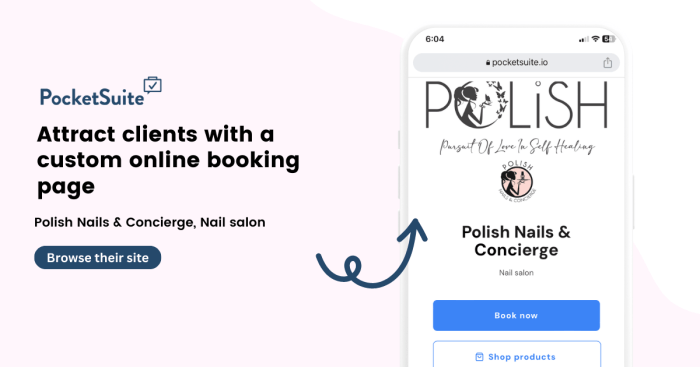
Source: pocketsuite.io
Streamlining your nail salon’s operations often involves connecting your nail salon software with other essential business tools. This integration fosters efficiency, reduces manual data entry, and provides a more holistic view of your business performance. By linking different systems, you can automate tasks, improve accuracy, and gain valuable insights that inform better decision-making.
Integrating your nail salon software with other business tools offers significant advantages. For example, connecting it to your accounting software automates the transfer of financial data, eliminating the need for manual reconciliation and reducing the risk of errors. Similarly, integrating with appointment scheduling platforms ensures seamless appointment management and reduces scheduling conflicts. This interconnectedness enhances the overall operational efficiency and profitability of your business.
Integration Options for Popular Business Tools
Several methods exist for integrating your nail salon software with other business tools. These include direct API integrations, which offer the most seamless data exchange; file-based integrations, where data is exported and imported in specific formats (like CSV); and third-party integration platforms that act as intermediaries, connecting disparate systems. The optimal approach depends on the specific software involved and the level of integration desired. For instance, a direct API integration with QuickBooks might provide real-time financial updates, whereas a file-based integration with a marketing platform may involve daily or weekly data transfers.
Data Synchronization Between Systems
Maintaining consistent and accurate data across all integrated systems is paramount. Data synchronization ensures that information is updated in real-time or at predetermined intervals, preventing discrepancies and ensuring everyone works with the most current information. This is crucial for maintaining accurate financial records, managing appointments effectively, and providing consistent customer service. A lack of synchronization can lead to confusion, scheduling errors, and inaccurate reporting, negatively impacting your business operations. For example, if appointment data isn’t synchronized between your scheduling software and your CRM, you might double-book clients or miss opportunities for follow-up marketing.
Examples of Potential Integrations and Their Advantages
Consider the benefits of integrating your nail salon software with various business tools:
- Accounting Software (e.g., QuickBooks, Xero): Automated transfer of financial data, reducing manual entry and improving accuracy. This streamlines financial reporting and simplifies tax preparation.
- Customer Relationship Management (CRM) Software (e.g., Salesforce, HubSpot): Centralized customer information, enabling personalized marketing campaigns and improved customer service. This facilitates targeted promotions and enhances customer loyalty.
- Appointment Scheduling Software (e.g., Acuity Scheduling, Calendly): Seamless appointment booking and management, reducing scheduling conflicts and improving client satisfaction. This leads to increased efficiency and minimizes no-shows.
- Email Marketing Platforms (e.g., Mailchimp, Constant Contact): Automated email marketing campaigns based on client data, fostering customer engagement and driving repeat business. This helps in promoting special offers and new services effectively.
- Point of Sale (POS) Systems (e.g., Square, Shopify): Integrated payment processing and sales tracking, providing a comprehensive view of sales performance. This enables better inventory management and informed business decisions.
Security and Data Privacy
Protecting sensitive client and business data is paramount for any nail salon, and choosing software with robust security features is crucial. Reputable nail salon software prioritizes data security through a multi-layered approach, ensuring the confidentiality, integrity, and availability of information. This involves technical safeguards, procedural controls, and adherence to relevant data privacy regulations.
Data encryption and regular backups are fundamental components of a comprehensive security strategy. These measures significantly reduce the risk of data breaches and ensure business continuity in the event of unforeseen circumstances, such as hardware failure or cyberattacks. Compliance with regulations like GDPR (in Europe) and CCPA (in California) is also vital, demonstrating a commitment to responsible data handling and protecting client privacy rights.
Data Encryption Methods
Strong encryption protocols are employed to safeguard data both in transit and at rest. This means data is encrypted while being transmitted between devices and servers, and also while stored on servers and databases. Common encryption methods include AES (Advanced Encryption Standard) with at least 256-bit keys, providing a high level of protection against unauthorized access. Software may also use SSL/TLS certificates to secure communication channels.
Backup and Disaster Recovery Procedures
Regular automated backups are essential for data protection. These backups should be stored securely, ideally offsite or in a cloud-based storage system that is geographically separate from the primary data location. A comprehensive disaster recovery plan should be in place, outlining procedures to restore data and systems in the event of a system failure, natural disaster, or cyberattack. This plan should include regular testing to ensure its effectiveness.
Compliance with Data Privacy Regulations, Nail salon software
Reputable nail salon software providers ensure their products comply with relevant data privacy regulations. This includes adhering to principles such as data minimization (collecting only necessary data), purpose limitation (using data only for specified purposes), and data security (implementing appropriate technical and organizational measures). The software should provide features that enable users to easily comply with data subject requests, such as the right to access, rectification, erasure, and data portability. Specific regulations addressed may include GDPR, CCPA, HIPAA (if handling protected health information), and other relevant regional or national laws.
Best Practices for Securing Sensitive Data
Implementing best practices is crucial for maintaining a secure environment. This includes:
- Strong password policies: Enforcing the use of strong, unique passwords for all user accounts.
- Access control: Implementing role-based access control to limit user access to only the data they need.
- Regular security updates: Keeping the software and operating systems up-to-date with the latest security patches.
- Security awareness training: Educating employees on security best practices, such as phishing awareness and password security.
- Regular security audits: Conducting regular security audits to identify and address vulnerabilities.
- Multi-factor authentication (MFA): Enabling MFA for all user accounts to add an extra layer of security.
Choosing the Right Software
Selecting the appropriate nail salon software can significantly impact efficiency, profitability, and overall client satisfaction. The right software streamlines operations, improves client management, and provides valuable data-driven insights for informed business decisions. A careful evaluation process, considering various factors, is crucial for a successful implementation.
Factors to Consider When Selecting Nail Salon Software
Several key aspects should be carefully considered when choosing nail salon software. These factors directly influence the software’s effectiveness and long-term value to your business. Ignoring these could lead to inefficient workflows or even software incompatibility.
- Scalability: The software should accommodate your salon’s current size and have the capacity to scale as your business grows. Consider factors like the number of employees, clients, and services offered, anticipating future expansion.
- Ease of Use: Intuitive software minimizes training time and ensures smooth adoption by your staff. Look for user-friendly interfaces and clear navigation. A complicated system will only hinder productivity.
- Features: Essential features include appointment scheduling, client management, payment processing, inventory tracking, and reporting. Advanced features like marketing tools and employee management modules can further enhance efficiency.
- Integration Capabilities: Compatibility with existing systems, such as accounting software or payment gateways, is vital for seamless data flow and reduced manual data entry.
- Customer Support: Reliable and responsive customer support is essential for addressing any technical issues or questions that may arise. Consider the availability of phone, email, or chat support.
Comparing Features and Pricing of Different Software Providers
Different software providers offer varying features and pricing structures. A thorough comparison is essential to find the best fit for your salon’s needs and budget. Consider factors like subscription costs, additional fees, and contract terms. Free trials are valuable for assessing user-friendliness and feature suitability.
| Software Provider | Key Features | Pricing (Monthly/Annual) | Customer Support |
|---|---|---|---|
| Example Software A | Appointment scheduling, client management, payment processing | $50/month or $500/year | Email and phone support |
| Example Software B | Appointment scheduling, client management, payment processing, inventory management | $75/month or $750/year | Email, phone, and chat support |
| Example Software C | Appointment scheduling, client management, payment processing, inventory management, marketing tools | $100/month or $1000/year | 24/7 phone and chat support |
Note: These are hypothetical examples. Actual pricing and features will vary depending on the provider and specific plan.
Checklist for Evaluating Software Options Based on Specific Salon Needs
Before making a decision, create a checklist based on your specific salon requirements. This helps you systematically evaluate each software option and prioritize features according to your business needs.
- Appointment Scheduling: Does the software allow for online booking, staff scheduling, and appointment reminders?
- Client Management: Can it store client information, track services history, and manage client communication?
- Payment Processing: Does it integrate with popular payment gateways and offer secure transactions?
- Inventory Management: Can it track product stock levels, manage orders, and generate reports on inventory usage?
- Reporting and Analytics: Does it provide detailed reports on sales, revenue, and client activity?
Decision-Making Framework to Guide the Selection Process
A structured approach to software selection ensures a well-informed decision. Prioritize features based on your salon’s needs, compare pricing and support options, and consider long-term scalability. A trial period can provide valuable hands-on experience.
Prioritize features based on their impact on efficiency and revenue generation. A cost-benefit analysis can help justify the investment in specific software features.
Last Recap
Ultimately, choosing the right nail salon software is a strategic investment that can significantly impact your business’s success. By carefully considering the features, pricing, and integration capabilities of different solutions, and prioritizing data security and client privacy, you can empower your salon to operate more efficiently, enhance client experiences, and achieve sustainable growth. The right software can be the key to unlocking your salon’s full potential.