
Free woodworking software design opens up a world of creative possibilities for hobbyists and professionals alike. This guide explores the diverse landscape of available software, detailing their features, limitations, and capabilities. We’ll delve into 2D and 3D modeling, rendering techniques, and even tackle the complexities of designing intricate projects. Discover how to leverage these free tools to bring your woodworking visions to life, from simple birdhouses to elaborate custom cabinets.
We’ll examine various software options, comparing their user interfaces and supported file formats. We’ll also address common challenges, such as handling complex designs and finding reliable support within online communities. This exploration aims to equip you with the knowledge and resources needed to confidently navigate the world of free woodworking software design.
Software Overview
Choosing the right free woodworking design software can significantly impact your project planning and execution. This section provides an overview of several available options, highlighting their strengths and weaknesses to aid in your selection process. Careful consideration of features, limitations, and system requirements is crucial for a smooth and efficient workflow.
Free Woodworking Design Software Options
Selecting appropriate software depends heavily on your specific needs and technical proficiency. The following table compares five popular free options, detailing their key features, limitations, and system requirements. Note that “free” often means limitations on features or export capabilities in the unpaid versions.
| Software Name | Key Features | Limitations | System Requirements |
|---|---|---|---|
| SketchUp Free (Web-based) | 3D modeling, intuitive interface, large online community, extensive plugin library (some paid), basic drawing tools | Limited advanced features compared to paid versions, reliance on internet connection, potential for slow performance with complex models | Web browser (Chrome recommended), stable internet connection |
| Fusion 360 (Free for hobbyists) | Powerful 3D modeling, CAM capabilities (computer-aided manufacturing), rendering, simulation, collaborative features | Steeper learning curve than some other options, requires an Autodesk account, some features are limited in the free version | Windows, macOS, or Linux; moderate system resources required for optimal performance |
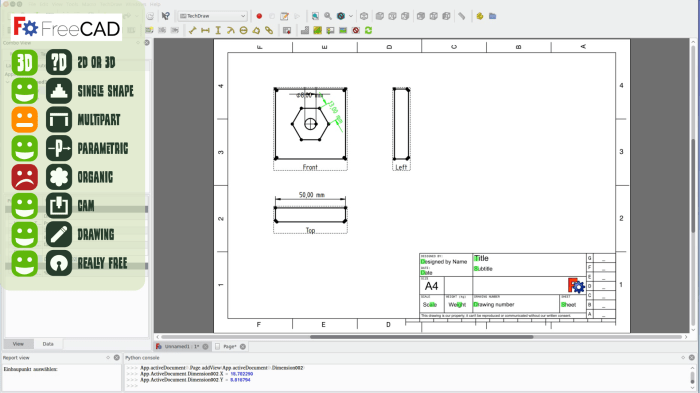
| FreeCAD | Open-source parametric 3D modeler, extensive customization options, supports various file formats | Steep learning curve, less intuitive interface than some commercial options, community support may be less readily available compared to SketchUp | Windows, macOS, Linux; moderate system resources required for optimal performance |
| OpenSCAD | Open-source, based on a text-based scripting language, powerful for creating complex designs | Requires learning a programming language, less intuitive for beginners, not ideal for quick prototyping | Windows, macOS, Linux; relatively low system resource requirements |
| VCarve Desktop (limited free version) | 2D design and CAM capabilities, specifically geared towards CNC routing, relatively easy to learn | Limited features in the free version, primarily focused on 2D design and CAM, may lack advanced 3D modeling capabilities | Windows; moderate system resources required |
User Interface Comparison
The user interfaces of SketchUp Free, Fusion 360, and FreeCAD differ significantly in their approach to design and interaction. SketchUp Free boasts a highly intuitive interface, ideal for beginners, with a simple drag-and-drop system for creating 3D models. Fusion 360, while powerful, presents a more complex interface with numerous tools and options, requiring a steeper learning curve. FreeCAD, being open-source, offers a more customizable interface but might feel less polished or intuitive compared to the others. Each software’s ease of use is directly related to the user’s prior experience with CAD software and their comfort level with complexity.
File Format Support and Compatibility
These free woodworking software options generally support common file formats like DXF (Drawing Exchange Format), SVG (Scalable Vector Graphics), STL (Stereolithography), and sometimes STEP (Standard for the Exchange of Product model data). However, compatibility issues can arise due to variations in how software handles these formats. For instance, exporting a complex model from one program and importing it into another might result in data loss or inconsistencies. It’s crucial to test compatibility between your chosen software and any downstream applications (e.g., CNC machine control software) before relying on the design for fabrication.
Design Capabilities: Free Woodworking Software Design
Source: wayofwood.com
Free woodworking design software offers a range of capabilities, from basic 2D sketching to complex 3D modeling, enabling users to plan and visualize their projects before ever touching a saw. The level of detail and sophistication varies greatly depending on the specific software chosen. This section will explore the design capabilities of three popular free options, comparing their strengths and limitations.
2D and 3D Modeling Capabilities of Free Woodworking Design Software
Three free woodworking design software packages demonstrate varying levels of 2D and 3D modeling capabilities. SketchUp Free, a browser-based option, excels in intuitive 3D modeling, allowing for the creation of relatively complex projects with its easy-to-use interface. Its 2D capabilities are more limited, primarily serving as a support for 3D visualization. On the other hand, FreeCAD, a more advanced, open-source program, offers robust 2D and 3D modeling features, suitable for highly detailed designs. However, its steeper learning curve may pose a challenge for beginners. Finally, OpenSCAD, a purely script-based program, focuses heavily on precise 3D modeling through code, making it ideal for users comfortable with programming but less accessible for those preferring a graphical interface. Complex projects, such as detailed furniture pieces, are achievable in FreeCAD, while SketchUp Free is better suited for simpler projects like birdhouses or small boxes. OpenSCAD’s strength lies in generating highly parametric and repeatable designs, making it suitable for complex projects that require precise control over dimensions and variations.
Designing a Birdhouse using SketchUp Free
This example demonstrates designing a simple birdhouse in SketchUp Free. The process involves utilizing basic tools such as the “Line” tool to draw the Artikel of the birdhouse’s walls and roof, the “Push/Pull” tool to give the shapes depth and create the three-dimensional structure, and the “Move” tool to position components accurately. The “Offset” tool can be used to create the entrance hole.
Imagine a screenshot showing the initial 2D Artikel of the birdhouse base and walls. The lines are clean and clearly defined. A second screenshot would illustrate the use of the “Push/Pull” tool, showing the walls and roof now extruded into three dimensions. The entrance hole is clearly visible, precisely placed using the offset tool. A final screenshot depicts the completed birdhouse model, showing the textured wood finish and the overall dimensions. This visual process showcases the intuitive nature of SketchUp Free, allowing for easy manipulation and adjustment of the design elements. The software’s simplicity is its strength, making it accessible even to users without prior CAD experience.
Rendering Capabilities Comparison: SketchUp Free and FreeCAD
SketchUp Free provides basic rendering capabilities, offering a simple, visually appealing representation of the 3D model. The quality is sufficient for basic presentations or project documentation but lacks the advanced features found in professional rendering software. FreeCAD’s rendering capabilities are more limited; its primary focus is on precise modeling rather than photorealistic visualization. Therefore, images generated by FreeCAD are suitable for technical documentation, showing precise dimensions and construction details, but may not be as visually appealing as those from SketchUp Free for presentations intended for a wider audience. The generated images from SketchUp Free tend to be smoother and more visually appealing, while those from FreeCAD are more utilitarian and focus on technical accuracy.
Advanced Features and Limitations
Source: woodworkingnetwork.com
Finding the right free woodworking software design can be tricky, requiring careful consideration of features and ease of use. Sometimes, exploring software in other creative fields offers perspective; for instance, the intuitive interface of music production software debster highlights the importance of user-friendly design, a quality also crucial in good woodworking software. Ultimately, the best free woodworking software will depend on your individual needs and project complexity.
Free woodworking software offers a surprising array of capabilities, but understanding its strengths and weaknesses is crucial for effective project planning. While some packages provide advanced features comparable to their paid counterparts, limitations exist, particularly in rendering quality, comprehensive feature sets, and readily available support. This section will explore these advanced features and limitations in detail, offering practical strategies to navigate them.
Advanced Features in Free Woodworking Software
Several free woodworking software packages incorporate surprisingly sophisticated features. Three noteworthy examples are CNC integration, material optimization tools, and the ability to create photorealistic renderings (though often with limitations compared to paid software). CNC integration allows direct export of designs to CNC machines, streamlining the fabrication process and reducing manual work. Material optimization tools help minimize waste by efficiently arranging pieces within a given sheet of material. The ability to generate photorealistic renderings, while potentially limited in resolution or detail, allows for a more accurate visualization of the finished product before construction begins. These features significantly enhance the design and production process, increasing efficiency and reducing errors.
Limitations of Free Woodworking Software
Free woodworking software, while useful, typically falls short of professional-grade paid options in several key areas. Rendering quality is often a significant limitation, with free software producing less realistic and detailed visuals. This can hinder accurate visualization and communication with clients or contractors. The feature set is usually more limited; complex modeling tools, advanced simulations, or specialized functionalities found in paid software are often absent. Finally, technical support is usually less comprehensive, leaving users to rely on online forums or community support rather than dedicated customer service. These limitations can impact the overall workflow, especially for complex projects or those requiring a high level of precision.
Workarounds for Limitations in Free Woodworking Software
Many limitations of free woodworking software can be mitigated through strategic workarounds.
- Breaking Down Complex Designs: Instead of attempting to model an extremely intricate piece in one go, break the design down into smaller, manageable components. Each component can be designed and rendered separately, then assembled virtually or physically.
- Utilizing External Rendering Software: If rendering quality is a concern, export the model from the free software and import it into a free or low-cost external rendering program. This allows you to leverage more powerful rendering capabilities without needing to switch your primary design software.
- Leveraging Online Communities and Tutorials: The lack of dedicated technical support can be overcome by actively participating in online forums and communities dedicated to the specific free software being used. Many tutorials and troubleshooting guides are available online, often created by experienced users.
- Manual Calculations and Planning: For tasks like material optimization, where the software’s tools are insufficient, revert to manual calculations or utilize readily available online calculators and spreadsheets. This requires more time and effort, but ensures accuracy.
- Using Multiple Software Packages: Combining the strengths of several free software packages can address specific limitations. For example, one program might excel at 3D modeling, while another might offer better rendering capabilities. This approach demands more coordination but can lead to superior results.
Community and Resources

Source: builderology.com
The success of any free software project hinges significantly on the strength of its community. Free woodworking design software is no exception; a vibrant online community offers invaluable support, shared knowledge, and collaborative problem-solving for users of all skill levels. This section explores the resources available, highlighting the benefits and drawbacks of relying on community support.
Online communities provide a vital ecosystem for users to connect, share tips, and troubleshoot issues. This collaborative environment fosters learning and innovation, ultimately enriching the user experience.
Online Communities and Forums, Free woodworking software design
Several online forums and communities cater specifically to users of free woodworking design software. While specific software names often change and communities may merge or decline, the general principle remains consistent. Typically, these online spaces function as question-and-answer platforms, offering a space for users to seek help with software functionality, design challenges, and troubleshooting errors. Users often share their projects, seeking feedback and offering assistance to others. Resources such as downloadable templates, material lists, and even complete project plans are frequently shared within these communities, creating a rich resource for users. The level of support varies depending on the activity of the community and the specific software in question; however, the potential for assistance is generally high, especially for common problems.
Tutorials and Guides
The availability of online tutorials and guides is a significant advantage of using free woodworking design software. Many experienced users create and share their knowledge through video tutorials on platforms like YouTube and written guides on websites and blogs. These resources often cover advanced techniques not explicitly covered in the software’s documentation.
- Tutorial 1: Mastering Parametric Modeling in [Software Name]: This tutorial, often found on YouTube, might demonstrate how to use parametric modeling features to create complex joinery or furniture components efficiently. The tutorial would likely show how to create reusable design elements that can be easily modified to create variations of the same design. This saves significant time and effort compared to manually creating each component from scratch. The usefulness lies in demonstrating efficient workflow and advanced design capabilities.
- Tutorial 2: Advanced Rendering Techniques in [Software Name]: A tutorial focused on rendering techniques could showcase methods to create photorealistic images of designs. This could involve using different lighting setups, materials, and rendering engines to produce high-quality visuals for presentations or client approvals. The tutorial’s value is in improving the visual communication of designs, making them more appealing and professional.
- Tutorial 3: Optimizing Material Usage and Waste Reduction in [Software Name]: This type of tutorial, perhaps found on a woodworking blog, could focus on strategies to minimize material waste during the design and cutting process. This might involve techniques like nesting components efficiently within sheet materials or utilizing software features to optimize cut lists. The practical usefulness of this tutorial is substantial, as it directly translates to cost savings and environmentally conscious woodworking practices.
Benefits and Drawbacks of Community Reliance
Relying on online communities for support offers several benefits, including access to a wide range of expertise, rapid response times to common issues, and the chance to learn from the experiences of others. However, there are also potential drawbacks. The quality of information can vary, and solutions provided by community members may not always be accurate or optimal. Furthermore, the availability of help can fluctuate depending on community activity levels. It’s crucial to approach community support with a critical eye, verifying information from multiple sources when possible and always exercising caution when implementing solutions from unknown sources. Finally, while communities can provide valuable support, they cannot replace the thorough understanding of the software’s capabilities and limitations that comes from dedicated learning and practice.
Illustrative Examples
This section provides detailed examples of how free woodworking software can be used to design and plan various woodworking projects, ranging from complex cabinets to simple shelves and cutting boards. We’ll explore the design process, focusing on planning and execution, and demonstrate the creation of detailed construction drawings.
Designing a Custom Cabinet
Designing a custom cabinet, such as a built-in entertainment center, involves several key steps that can be significantly streamlined with free woodworking software. The planning stage begins with defining the overall dimensions and functionality. This includes determining the number of shelves, drawers, and doors, as well as their placement and size. Using the software, we can create a 3D model of the cabinet, experimenting with different configurations and visualizing the final product. This allows for precise measurements and adjustments before any actual cutting begins. Once the design is finalized, the software can generate detailed cutting lists, specifying the dimensions and quantity of each board required. The execution stage involves transferring the design to the wood, using the generated cutting lists and the software’s visualization tools to guide the cutting, assembly, and finishing processes. Precise measurements from the software minimize material waste and ensure a perfect fit of all components. The software can also assist in creating accurate joinery details, ensuring the structural integrity of the cabinet.
Creating Construction Drawings for a Shelf
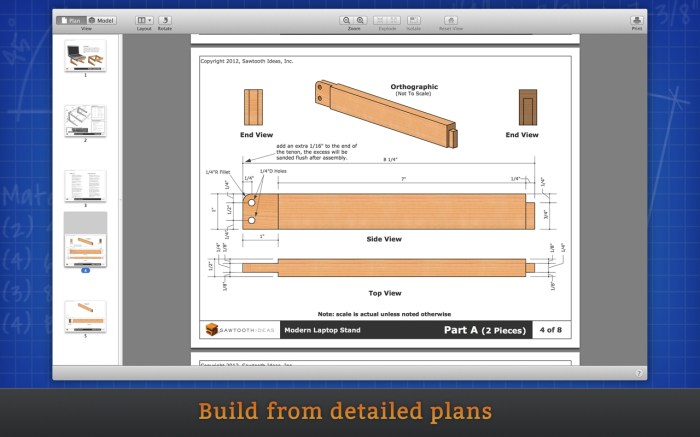
Let’s consider a simple project: building a floating shelf. We’ll use free woodworking software to create detailed construction drawings. First, the dimensions of the shelf are inputted into the software, defining its length, width, and depth. Next, we design the hidden brackets that will support the shelf, specifying their dimensions and placement. The software allows us to visualize the shelf in 3D, ensuring that the brackets are appropriately sized and positioned to securely hold the shelf. The software then generates detailed orthographic drawings, showing top, front, and side views of the shelf and brackets. These drawings include precise measurements for all components, facilitating accurate cutting and assembly. Additionally, the software might offer features to generate a materials list and cutting diagrams, further simplifying the construction process. This step-by-step approach, guided by the software, ensures a precisely built shelf that is both functional and aesthetically pleasing.
Workflow for Designing a Cutting Board
Creating a cutting board provides a straightforward illustration of the design-to-production workflow. The process begins by defining the desired dimensions and shape of the cutting board in the software. This might involve selecting a simple rectangular shape or designing a more complex, custom shape. The software allows for easy adjustments and experimentation with different sizes and forms. Material selection is the next step. The software may offer a database of common woodworking materials, allowing the user to choose the appropriate type of wood, considering factors such as hardness, durability, and aesthetic appeal. Once the design and material are finalized, the software generates a cutting diagram, specifying the dimensions and orientation of the wood pieces needed. The cutting process can then be undertaken, following the generated diagram. Finally, the cut pieces are assembled, sanded, and finished according to the user’s preferences, resulting in a finished cutting board that precisely matches the original design. The entire process, from initial concept to final product, is streamlined and simplified using the free woodworking software.
Wrap-Up
Mastering free woodworking software design empowers you to transform your woodworking projects. From initial concept to final construction, these tools streamline the design process, allowing for greater precision and creativity. While limitations exist compared to paid software, the wealth of free options, coupled with readily available online resources and supportive communities, makes this a compelling approach for woodworkers of all skill levels. Embrace the possibilities, explore the software, and unlock your woodworking potential.
